Real-Time Two-Way SMS Communication
Send, receive, and manage SMS conversations directly from your WordPress dashboard
Interactive SMS Inbox
View and manage all incoming SMS messages in a dedicated inbox within your WordPress admin. Reply directly to messages without leaving your dashboard.
SMS Commands
Set up automated command responses. Customers can text keywords like 'CANCEL 123' to manage orders or trigger specific actions automatically.
WooCommerce Integration
Manage WooCommerce orders via SMS. Customers can check order status, cancel orders, or get updates by sending simple text commands.
Email Forwarding
Forward all incoming SMS messages to an email address. Never miss an important message even when you're away from your dashboard.
Phone Forwarding
Forward incoming messages to another mobile phone number. Stay connected on the go with instant notifications.
Auto Webhook Registration
Automatically register webhooks with supported gateways. No manual configuration needed for most providers.
Multi-Gateway Support
Works with Twilio, Nexmo/Vonage, Plivo, Telnyx, Clickatell, and many more SMS providers that support two-way messaging.
Receive SMS from Users
Let customers text you anytime they have questions or requests.
Order Notes Integration
Insert notes to WooCommerce orders by sending a simple text command.
Subscribe or Unsubscribe
Make it easy for people to join or leave your SMS newsletter via text.
Streamlined Setup
Configure commands and features in just a few clicks. No coding required.
Auto-Reply Messages
Send pre-saved responses instantly when certain commands are detected.
Choose Your License
Select the license that fits your needs.
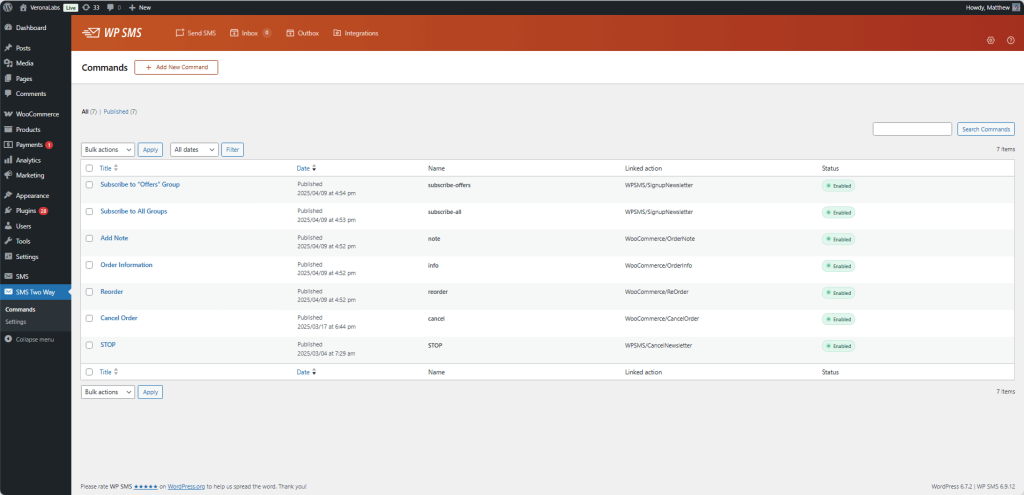
Interactive SMS Inbox
Frequently Asked Questions
Find answers to common questions about WSMS Pro.
Two-way messaging is supported by Twilio, Nexmo/Vonage, Plivo, ASPSMS, BulkGate, HelloSMS, Telnyx, Clickatell, and many others. Check with your gateway provider to confirm two-way support.
Yes! Customers can text commands like 'STATUS 12345' to check order status, 'CANCEL 12345' to request cancellation, or custom commands you define for specific actions.
When you enable email forwarding, every incoming SMS is automatically sent to your specified email address. You'll receive the sender's phone number, message content, and timestamp.
For most supported gateways, the add-on automatically registers webhooks. Some providers may require manual webhook URL configuration in their dashboard.
Yes, you can create pre-saved auto-reply messages that trigger based on keywords or for all incoming messages. This is great for after-hours responses or common inquiries.
Have more questions?
Contact our support team